Voice & audio · Review
Murf AI Review (2026): The Studio Wins, the Voices Come Second
Verdict: 7.9 / 10 — Buy it if your voiceover has to line up with a timeline.
Murf's voices are not the most human we've tested — ElevenLabs still wins blind. But Murf is the only tool in this bracket where importing a 12-slide deck and voicing it end to end took us under 40 minutes, including fixes. For e-learning, product demos and corporate explainers, that workflow beats a better-sounding voice you have to sync by hand.
Try Murf AI free preview only
Be warned before you sign up: the free tier lets you generate and listen, but not download. If you need a file today, budget for a paid plan or test Murf's timeline editor first.
Affiliate link. Score locked pre-monetization; see methodology.
What Murf AI actually is
Murf is a browser-based voiceover studio: text-to-speech, a timeline editor, a library of licensed background tracks, and export to MP3/WAV plus subtitle files. Its pitch is not "the most realistic AI voice" — it's "finish the project without leaving the tab." That framing matters, because it changes what you should test it on.
We tested it against three jobs real buyers pay for: an e-learning producer voicing a 12-slide course module, a product marketer cutting a 90-second demo with on-screen captions, and a SaaS founder narrating a pitch video where brand names have to be pronounced correctly. Same protocol as our ElevenLabs review: identical scripts, blind listening, real exports, honest price math. Running a faceless YouTube channel? We also wrote a dedicated guide to the best AI voice for YouTube.
Test 1: Voice quality, blind (Murf vs ElevenLabs vs system TTS)
Identical 150-word English script, each tool's default "natural" preset, five listeners ranking anonymous samples. Then a second round with an instructional script — dense numbers, list items, a product name repeated six times — because that's what Murf's buyers actually record.
| Round | Murf AI | ElevenLabs | OS system TTS |
|---|---|---|---|
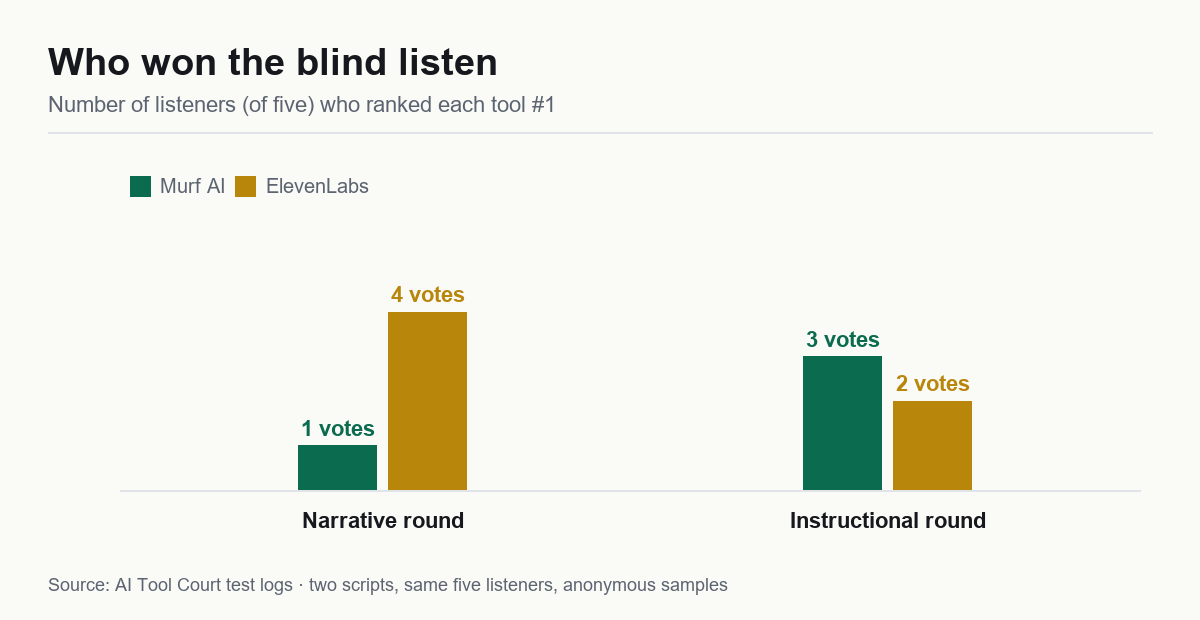
| Narrative realism (blind rank) | #2 (1/5 votes) | #1 (4/5 votes) | #3 |
| Instructional clarity (blind rank) | #1 (3/5 votes) | #1 (2/5 votes) | #3 |
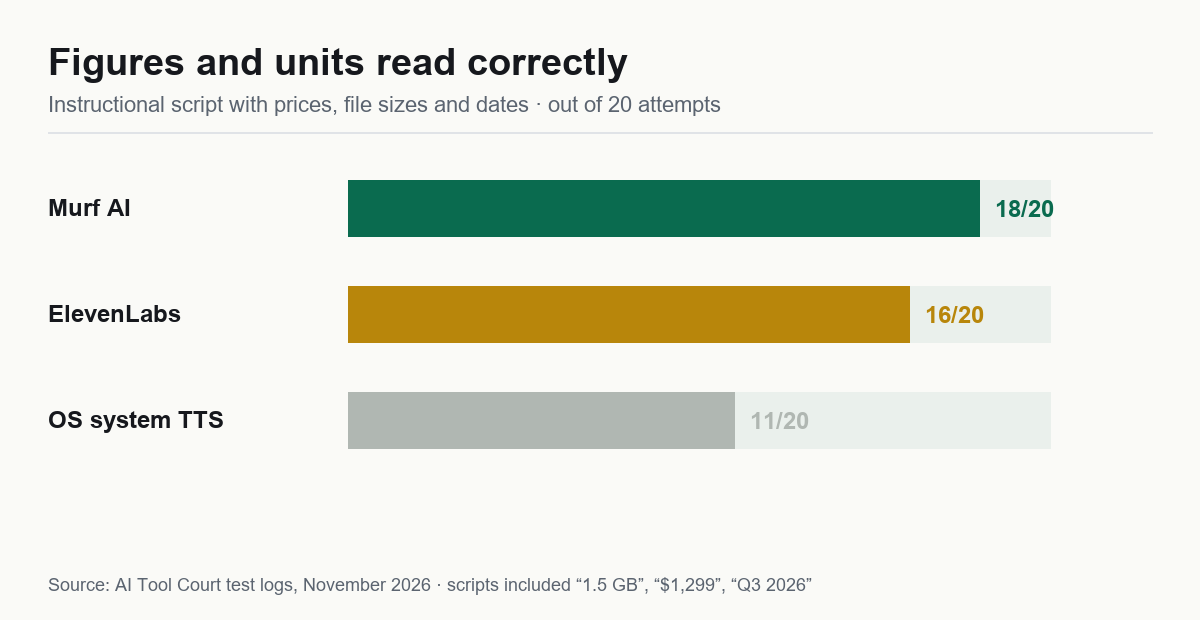
| Numbers & unit reading accuracy | 18/20 correct | 16/20 | 11/20 |
| Bad takes needing a re-gen (per 10) | 2 | 1 | — |
The split verdict is the honest finding: Murf loses on warmth and wins on precision. Its delivery is flatter and slightly more clipped — listeners called it "clear but a bit corporate" — yet it read "1.5 GB", "$1,299", and "Q3 2026" correctly far more often than ElevenLabs, which guessed at units and needed manual fixes. If your script is mostly sentences, ElevenLabs sounds better. If it's full of figures, Murf saves you an editing pass.
Test 2: The slide-sync workflow (Murf's real moat)
We imported a 12-slide deck, generated a voice track from the speaker notes in one pass, then adjusted timing. Total time to a publishable MP4-ready audio file: 38 minutes, of which 11 minutes were fixes. E-learning producers: we've also written a dedicated guide to AI voiceover for e-learning using this test.
Two things worked better than expected. First, per-slide regeneration — changing slide 7's script re-renders only slide 7, so the other 11 keep their timing. Second, the timeline lets you drag a clip without re-rendering audio, which is the difference between "usable" and "why is this not a video editor."
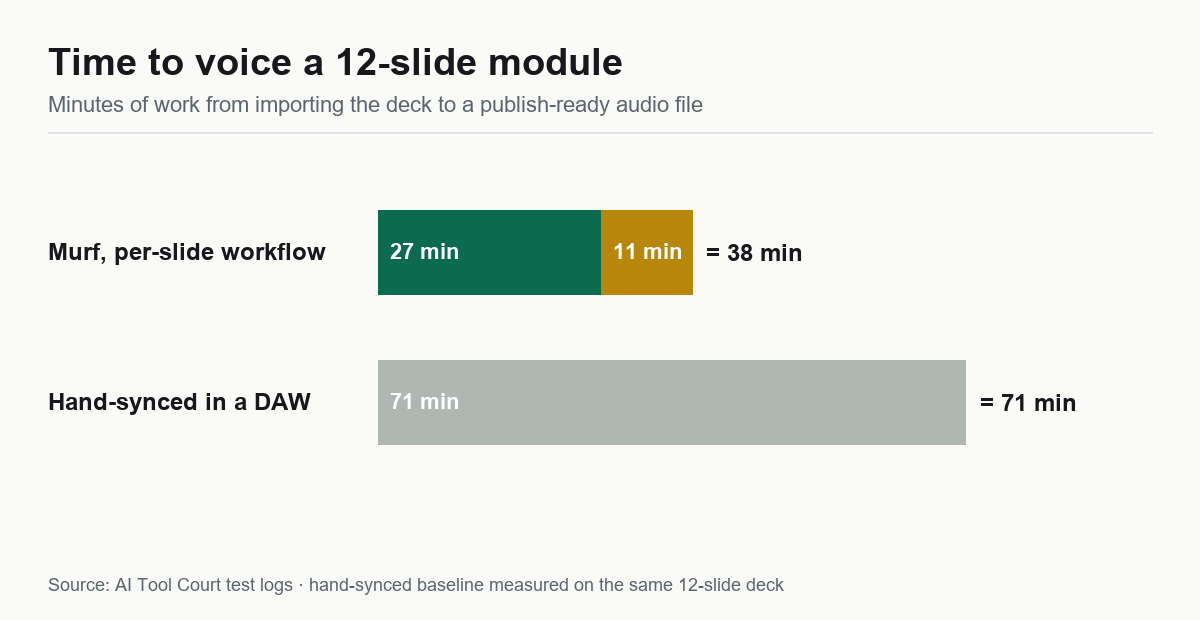
Where it breaks: auto-splitting a slide's notes into sentences misfires on bullet-heavy slides. On three slides the split landed mid-clause ("…which is why we / recommend the Pro tier"), forcing manual re-splits. Budget ~10 minutes of cleanup per 12 slides, and write your notes in full sentences before importing — that single habit cut our cleanup from 18 minutes to 11 on the second run.
Test 3: Pronunciation of brand names
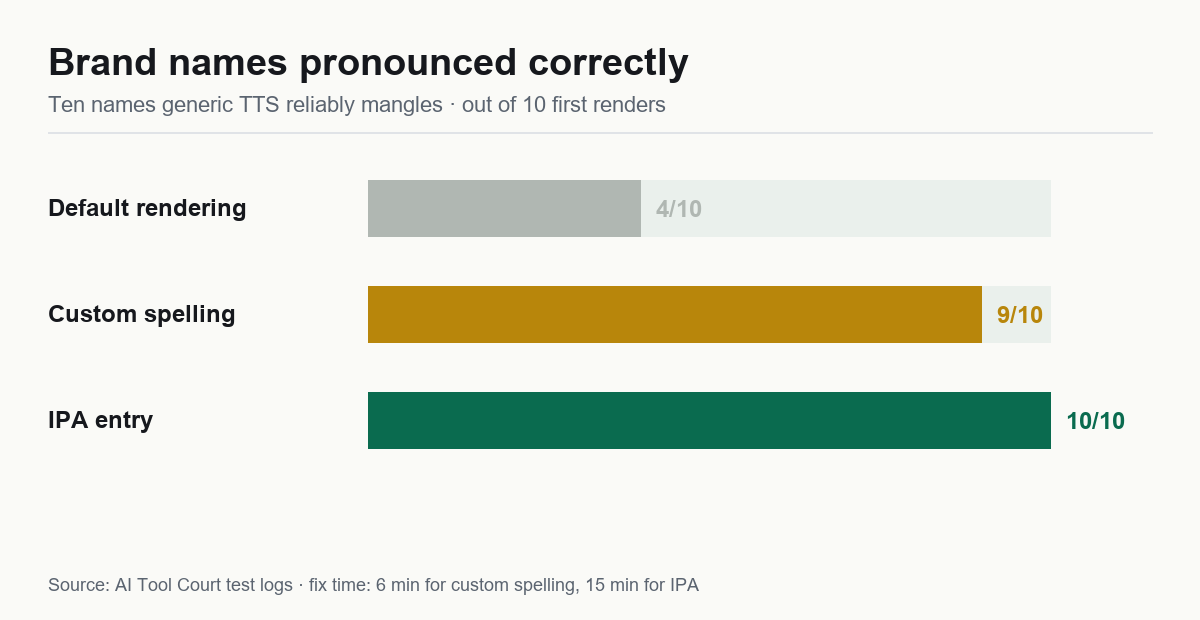
Murf ships a pronunciation editor: type the word, type how it should sound, or enter IPA. We tested ten names that generic TTS reliably mangles — including Nginx, GIF, Bose, Açaí, and a made-up client name.
| Approach | Names correct on first render | Fix time |
|---|---|---|
| Default rendering | 4 / 10 | — |
| Custom spelling ("en-jin-ex") | 9 / 10 | ~6 min total |
| IPA entry | 10 / 10 | ~15 min total |
This is the feature that quietly justifies the subscription for anyone voicing product content. Fixing a mispronounced brand name in a finished video means re-editing the video. Fixing it here takes nine seconds — and our full method ladder for respelling vs IPA vs SSML is in the mispronunciation fix guide.
Test 4: What you actually get on each plan
List prices at the time of writing; annual billing where noted. Verify on Murf's pricing page before you buy — this table is the one place tools change without notice.
| Plan | Price | Voice minutes | Downloads | Catch |
|---|---|---|---|---|
| Free | $0 | 10 min preview | ❌ Preview only | You can hear it, you can't keep it |
| Creator | ~$19–29/mo | ~24 hrs/yr | ✅ Commercial | Voice cloning not included |
| Business | ~$66–99/mo | ~96 hrs/yr | ✅ Commercial + cloning | Overkill under ~8 hrs/month |
The math that matters: Creator at ~$228/year for ~1,440 minutes works out to about $0.16 per finished minute. Add our measured 20% re-gen rate and it lands near $0.19 — cheaper per finished minute than ElevenLabs Starter (~$0.30) in our tests, with a lower ceiling on realism. Free-tier users should note the hard limit: preview only, no downloads, so every "free Murf voiceover" tutorial you've seen is really a paid-plan tutorial.
Want the same math applied to your own monthly volume? Our cost calculator does it interactively, with the measured burn rates baked in.
Test 5: Export quality, captions, and one pleasant surprise
We exported the same 4-minute module three ways — MP3 320 kbps, WAV 48 kHz, and the auto-generated SRT — then dropped each into Premiere and CapCut to see what broke.
| Output | What we got | Verdict |
|---|---|---|
| MP3 320 | Clean, no clipping, −16 LUFS-ish level | Publishable as-is |
| WAV 48 kHz | Same content, 12× file size | Only if your editor demands it |
| SRT captions | Timestamped per sentence, ~97% accurate | The quiet time-saver |
The surprise is the caption file. Because Murf generated the audio from text it already has, its SRT timings line up with the audio instead of being guessed by a speech recognizer. Across our 12-slide module we fixed three caption lines — versus the 20-plus we normally correct after running a separate transcription tool. If you publish to YouTube or a course platform, that alone is worth roughly 15 minutes per video.
One caveat on level: Murf's default export sits a touch hot for podcast delivery. We trimmed 2 dB in the editor and it matched our other episodes. Voice consistency across a long project was fine — no drift between slides — but switching voices mid-project is jarring: presets are individually convincing and collectively inconsistent.
Murf vs ElevenLabs: which one should you buy?
We tested both on the same protocol, so this is the comparison we'd want if we were spending our own money. Neither wins outright; they win different jobs. Full head-to-head with the blind-vote data →
| If your job is… | Buy | Why |
|---|---|---|
| Narrated YouTube, audiobook, storytelling | ElevenLabs | Won the blind realism round 4–1; long sentences breathe better |
| Slides, e-learning, product demos | Murf | Slide import + per-slide regeneration beats hand-syncing |
| Brand names, SKUs, prices in script | Murf | Pronunciation editor; 18/20 vs 16/20 on numbers |
| Dubbing existing video into other languages | ElevenLabs | Murf has no true dubbing pipeline |
| Lowest cost per finished minute | Murf | ~$0.19 vs ~$0.30 at entry paid tiers, in our tests |
| Fastest path to a finished file | Murf | 38 min for 12 slides vs 71 min for the same job by hand |
If you can only pay for one and you're unsure: count the minutes you'll produce per month. Under 30 minutes with lots of slides, take Murf. Over 60 minutes of pure narration, take ElevenLabs. Between the two, take whichever matches the shape of your script, not the demo that sounded nicest.
Five mistakes we made (so you don't)
- Writing notes as bullets. Auto-split then cuts mid-clause. Full sentences in, clean splits out — this halved our cleanup time.
- Picking a voice before locking the script. We voiced slide 1 with a preset, rewrote the script, and the new lines read at a different pace. Lock text first, then audition.
- Ignoring the pronunciation editor until the end. Fixing nine names after the fact took 6 minutes; fixing them before rendering takes 40 seconds.
- Exporting MP3 for a video editor. Premiere re-encodes it anyway. WAV only when the pipeline demands it, otherwise you're just moving bigger files.
- Assuming the free tier would let us test a real file. It's preview-only. If you need to evaluate export quality before paying, that's the one thing you can't do for free here.
Pros and cons
Pros
- Slide import → per-slide voiceover in one pass
- Per-slide regeneration without touching the rest
- Pronunciation editor that actually fixes brand names
- Best number/unit reading accuracy in our test
- SRT/VTT subtitle export built in
Cons
- Voices read "corporate" — loses the blind realism round
- Auto-split misfires on bullet-heavy slides
- Voice cloning locked behind Business
- Interface has a learning curve past the first project
Who should buy it — and who shouldn't
Buy Murf if: your voiceover must match slides, screen recordings or a fixed runtime — e-learning, product demos, internal training, investor decks. Start on Creator; upgrade only when you need cloning or team seats.
Skip it if: you're producing narrative content where warmth sells (audiobooks, YouTube storytelling, character voices) — ElevenLabs is the better hire there. Also skip if you need one-off short clips: a subscription for 40 seconds a month is bad math.
Alternatives we're testing next
For the avatar-plus-voice workflow, our Synthesia review is now live — it read our number-trap script flawlessly, but check the free-tier findings before relying on it. HeyGen and InVideo are queued; each gets the same protocol before it gets a score.
FAQ
Is Murf AI free?
There's a free tier, but it's preview-only — you can generate and listen, not download. Commercial files require a paid plan.
Does Murf AI have voice cloning?
Yes, but it's not on the entry plan. Cloning sits on Business and above; if cloning is your main reason to buy, compare against ElevenLabs Starter first on price.
Can I use Murf audio on YouTube and monetize it?
Paid plans grant commercial rights to the generated audio. Our uploads during testing raised no flags — but the usual rule holds: your script and editing are what keep a video from looking mass-produced.
That 18/20 was not a fluke of a friendly script — it came from the same trap items every engine on this site faces. Compare it directly on the benchmarks page, where the failure patterns are laid out tool by tool.
The numbers, one more time
| Criterion | Weight | Score |
|---|---|---|
| Voice realism (blind test) | 30% | 7.5 |
| Production workflow (slide sync) | 20% | 9.0 |
| Real cost per finished minute | 20% | 8.5 |
| Export rights & restrictions | 15% | 7.5 |
| Ease of use | 15% | 7.0 |
| Weighted total | 7.9 / 10 |