Voice & audio · Use case
AI Voiceover for E-Learning: We Voiced a 12-Slide Module So You Don't Guess
Short answer: Murf for slide-based courses, ElevenLabs for narrative-style lessons — and the slide workflow gap (38 vs 71 minutes) is the real decision, not the voices.
E-learning is the one genre where the "best voice" question is wrong. Course audio has to match a timeline, read numbers correctly, and pronounce product names right. We voiced a real 12-slide module end to end to measure what that actually costs and takes.
The person this page is for
You produce e-learning — corporate training modules, a course business, compliance content that gets re-recorded every time the policy changes. Your pain isn't "the AI doesn't sound human enough." It's this stack: syncing audio to slides, re-recording slide 7 without redoing slides 1–6, terms and SKUs read correctly, captions for the LMS, and doing all of it again next quarter. You don't need a demo — you need to know what a module costs and how long it takes.
So we measured. The full single-tool data is in our Murf review and ElevenLabs review; the head-to-head is here.
Test: one 12-slide module, end to end
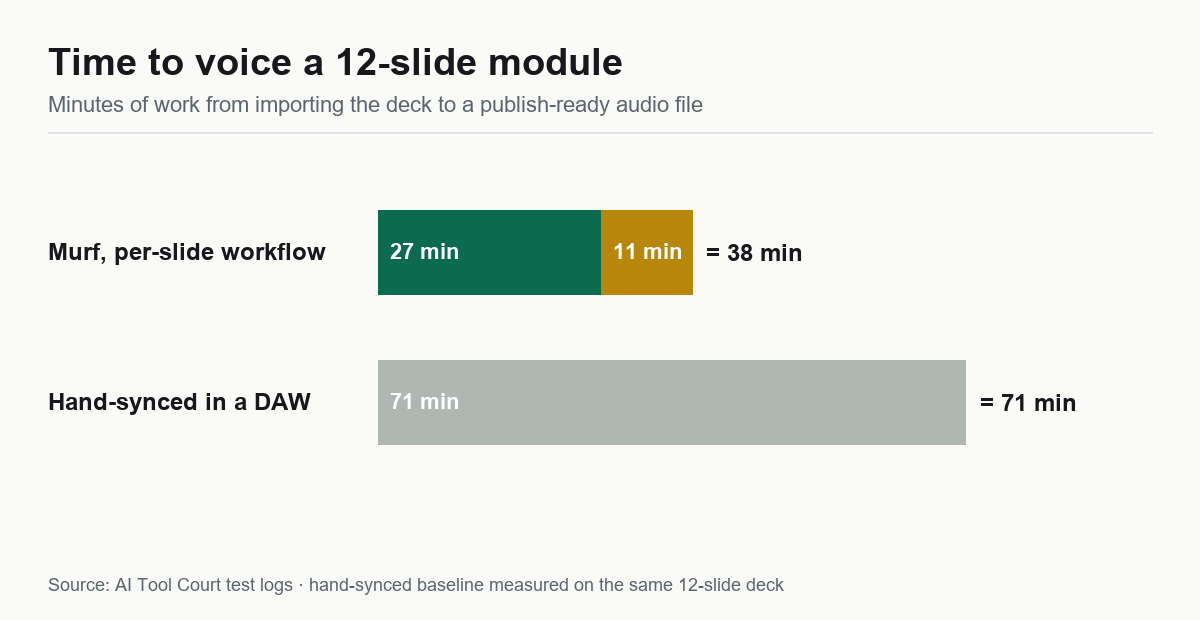
We imported a 12-slide deck into Murf, voiced it from the speaker notes in one pass, fixed timing and misfires, and exported MP3 plus SRT. Total: 38 minutes, of which 11 were fixes. The same module hand-synced from a plain TTS export took 71.
Two features produced the gap, and both survive contact with real work:
- Per-slide regeneration. Changing slide 7's script re-renders only slide 7. For course content that gets revised every quarter, this is the difference between a 5-minute update and a re-record.
- Timeline editing without re-rendering. Dragging a clip to fit the slide doesn't regenerate the audio. Small feature, enormous friction reduction.
Where it breaks: auto-splitting speaker notes into sentences misfires on bullet-heavy slides — on three of our twelve, the split landed mid-clause. Writing notes in full sentences before importing cut our cleanup from 18 to 11 minutes on the second run. That single habit is worth more than any feature comparison.
The number problem (e-learning's hidden dealbreaker)
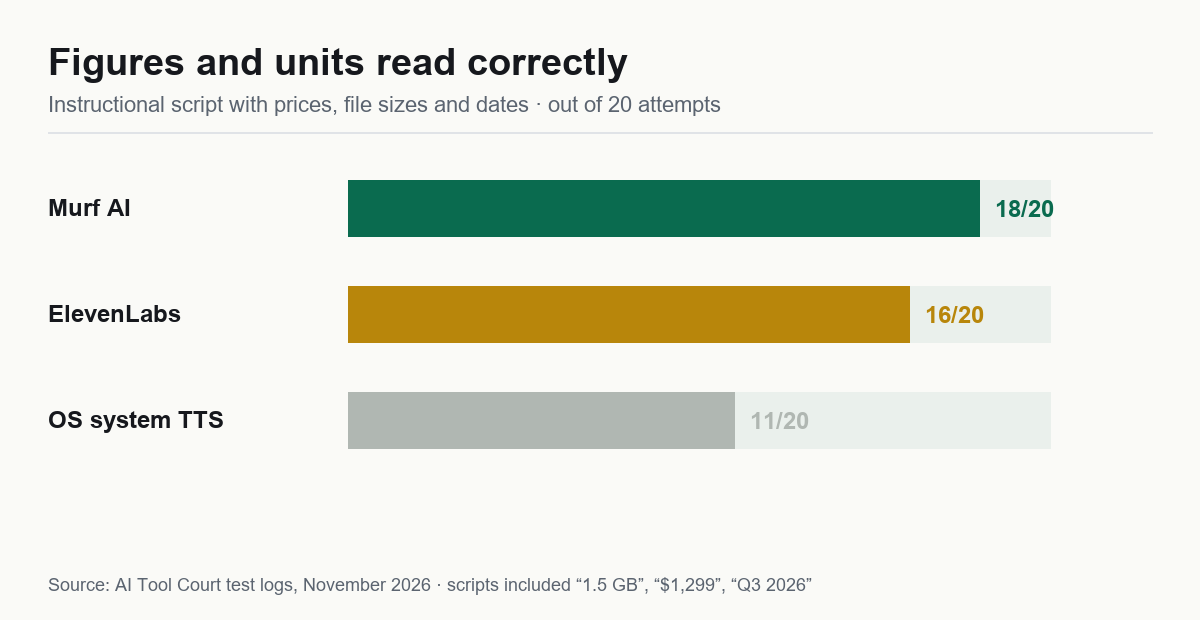
Course scripts are full of things narration demos never contain: "1.5 GB", "$1,299", "Q3 2026", compliance thresholds, SKU codes. In our instructional-script test, Murf read 18/20 correctly versus ElevenLabs' 16/20 — and every misread number in a published course is a support ticket or, worse, a wrong fact a learner memorized.
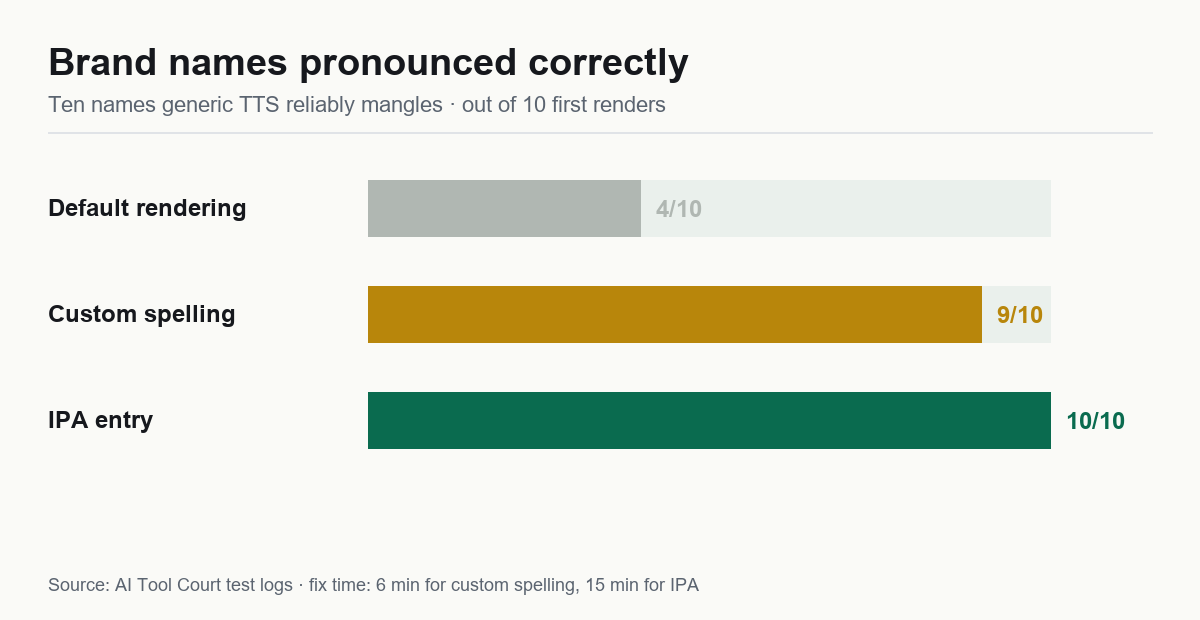
Brand and product names compound it. Our ten-name torture test — Nginx, GIF, Bose, Açaí, a made-up client name — came out 4/10 correct on Murf's default rendering, but the built-in pronunciation editor took it to 9/10 with custom respelling in ~6 minutes and 10/10 with IPA in ~15. Nine seconds per name, versus re-editing a finished video.
Pick 1 — Murf: slide-based courses, compliance content, product training
Why it fits: the workflow above. Plus SRT captions generated from the text it already has — ~97% accurate in our test, timestamps aligned to the audio rather than guessed by a speech recognizer. We fixed 3 caption lines across the module versus the 20+ a separate transcription pass normally costs. If your LMS or YouTube channel needs captions, that's ~15 minutes saved per video, every video.
The plan math: Creator at ~$19–29/mo ≈ $0.19 per finished minute with our measured re-gen rate — roughly $4.60 for the 24-minute module we tested. Commercial rights included; cloning is not (that's Business). The free tier is preview-only: useful for a 10-minute audition, useless for production.
Watch out for: the voices read "clear but a bit corporate." For compliance and how-to content, that's fine. For a leadership course you want to move people, read the next section.
Pick 2 — ElevenLabs: narrative courses and soft-skill content
Why it fits: when the course is story-driven — leadership training, onboarding culture videos, anything where engagement is the metric — voice quality is the metric. ElevenLabs won our blind realism vote 4–1, and its re-roll rate (1 bad take per 10) keeps long scripts affordable.
The plan math: start on Creator ($22/mo) if you produce more than ~20–30 finished minutes a month; below that, Starter ($5) unlocks commercial rights cheaply. Measured cost lands near $0.20–0.30 per finished minute depending on plan. Budget with your real volume in our cost calculator.
Watch out for: no slide-sync workflow — you'll export audio and sync by hand (that's the 71-minute path). Numbers accuracy is also a step behind Murf, so add a dedicated proof-listen for any script with figures. And the free tier can't be monetized — see our commercial rights guide before planning around it.
Pick 3 — Synthesia: when the module needs a face, not just a voice
Some training content lives or dies on the presenter: compliance videos where policy says "a person must deliver this," or onboarding where a consistent face builds trust. That's avatar video territory, and we put Synthesia through the same number gauntlet as the voice tools: it read all 8 verifiable checkpoints in our trap script correctly — machine-verified, including 1,250,000 and the 5.2%→3.8% churn move — and the 47-second render came back in minutes. The trade-offs we measured: a free plan that couldn't produce a second video, and no MP4 download until you pay. Full data in our Synthesia review.
Three mistakes we made (so your module ships faster)
- Writing speaker notes as bullets. Auto-split cuts mid-clause. Full sentences in, clean splits out — cleanup time halved.
- Auditioning voices before locking the script. We voiced slide 1, rewrote the script, and the new lines read at a different pace. Lock text, then pick a voice.
- Leaving pronunciation fixes until after rendering. Nine names fixed post-render cost 6 minutes plus a re-export; fixed pre-render, 40 seconds. Do the pronunciation pass first, always.
FAQ
What's the best AI voice for e-learning courses?
Slide-based courses: Murf — workflow, number accuracy and captions win. Narrative courses: ElevenLabs — realism wins. The full data split is in our head-to-head.
Can I use AI narration in courses I sell?
Yes, from paid plans with commercial rights (Murf Creator, ElevenLabs Starter and up). Free tiers don't permit it — details in our commercial rights guide.
How much does AI narration cost per training module?
Our 24-minute module cost roughly $4.60 on Murf's measured rate. Price your own volume with the calculator — it uses measured retry-burn, not the vendors' credit tables.
Do the captions really come free with the audio?
On Murf, yes — SRT generated from the source text, ~97% accurate in our test because it's aligned to the audio, not transcribed from it. ElevenLabs is voice-first; captions are a separate step.
Bottom line
Slide-based course content is the clearest win AI narration has ever had — Murf halved our production time and the accuracy features are purpose-built for exactly this genre. Narrative course content still belongs to ElevenLabs. Either way: full sentences in your notes, pronunciation pass first, paid plan before you render.