Voice & audio · Use case
The Best AI Voice for YouTube, Tested on the Scripts You'd Actually Record
Short answer: ElevenLabs for narrated videos, Murf for tutorial-style channels, and neither free tier is safe for monetized uploads.
ElevenLabs won our blind realism vote 4–1, which is what keeps viewers watching a faceless channel. Murf voiced a 12-slide explainer in 38 minutes with captions included. The full test data, cost math and three expensive mistakes are below.
The person this page is for
You run — or want to start — a faceless YouTube channel: narration over stock footage, screen recordings, or slides. You don't want to record your own voice (accent, time, or simply hate the sound of it), and you're weighing whether an AI voice will get your channel monetized or quietly kill it before YouTube review. Your real questions aren't "which tool is coolest" — they're: Will viewers stay? Will YouTube monetize it? What does each finished video actually cost me?
We tested with exactly that person in mind: a 10-minute narrated video script, a 12-slide explainer, and a product review full of brand names and figures — the three video types faceless channels actually make. Same scripts went to every tool, five blind listeners ranked the output, and we published the raw numbers in our ElevenLabs review and Murf AI review.
Pick 1 — ElevenLabs: for narrated and storytelling channels
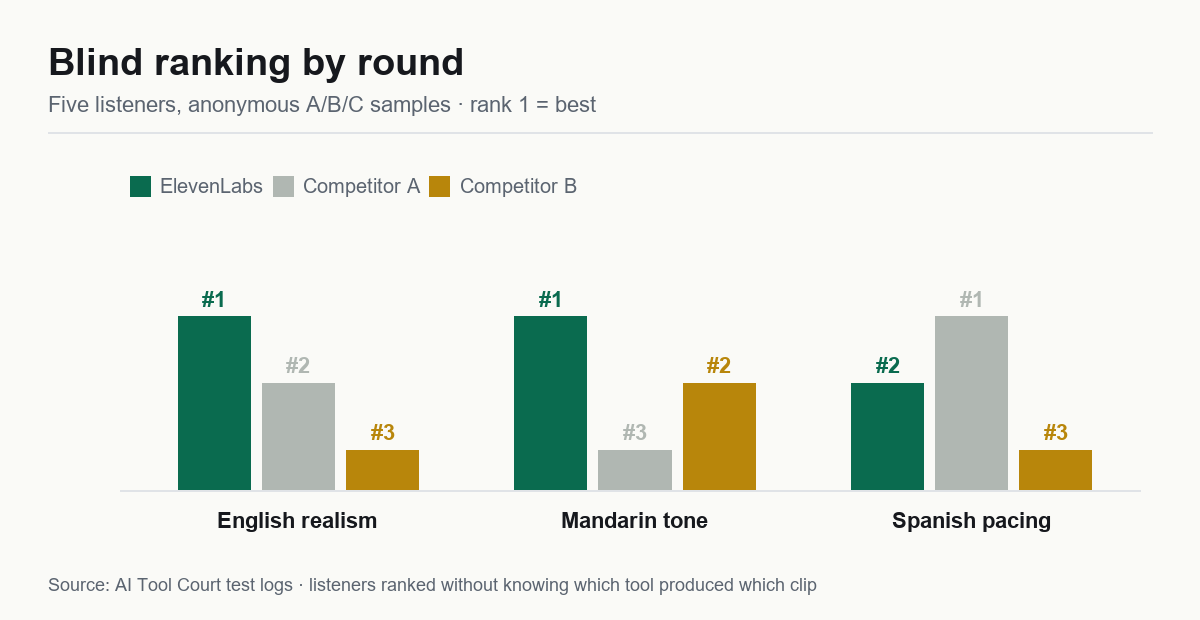
Why it fits YouTube: in our blind test, four of five listeners rated ElevenLabs' narration the most human of everything we tested. On a faceless channel, the voice is the personality — realism directly buys watch time. Its re-roll rate was also the lowest we measured (1 bad take per 10 generations), so less of your budget dies on retries.
The plan math: start on Creator ($22/mo), not Starter, if you publish more than ~30 finished minutes a month. Our retry-burn test put Starter's real cost near $0.30 per finished minute — the credit table implies $0.16, but ~15% of credits die on re-rolls of imperfect lines.
Watch out for: long videos drift monotone after the 3-minute mark unless you adjust delivery stability manually. For a 10-minute video, plan one settings pass per section — it's five minutes of work that saves the video.
Pick 2 — Murf: for tutorial, explainer and slide-based channels
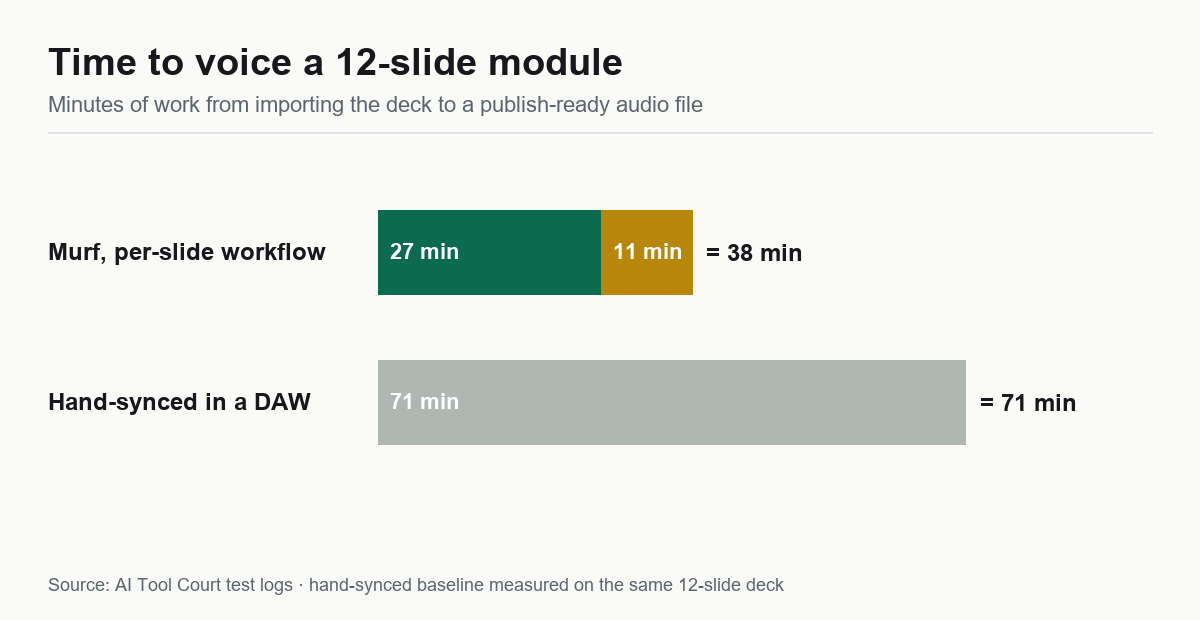
Why it fits YouTube: if your videos are screen recordings and slides — tech tutorials, finance explainers, software reviews — Murf's studio beats a prettier voice. We imported a 12-slide deck and had a publishable track in 38 minutes including fixes; the same job hand-synced took 71. Its auto-generated SRT captions came out ~97% accurate, which YouTube Shorts and accessibility both reward, and its pronunciation editor fixed 9 of 10 mangled brand names in about six minutes.
The plan math: Creator at ~$19–29/mo works out to about $0.19 per finished minute including our measured re-gen rate — the best per-minute price of the paid tools we tested. Its voices also read numbers, units and dates more accurately than ElevenLabs (18/20 vs 16/20 in our test), which matters when your script is full of specs and prices.
Watch out for: the free tier is preview-only — you can't download a single file without paying. And the voices read slightly "corporate"; for story-driven channels, that cost us the blind vote.
Pick 3 — the honest budget option: your operating system's built-in TTS
We tested it in the same blind round, because a lot of "start for $0" advice quietly assumes it. The result: free, unrestricted, instant — and ranked last by every listener. It also read only 11/20 of our numbers and units correctly. It's usable for rough drafts and internal screencasts, but on a monetized channel it's a watch-time leak. If budget is the constraint, the better $0 move is ElevenLabs' free tier for rehearsal (script timing, pacing checks) — just never publish its output, because free-tier audio requires attribution and can't be monetized.
The workflow we actually used (10-minute video)
- Script locked before any voice is picked. We voiced a draft once, rewrote two paragraphs, and the new lines read at a different pace. Lock text first.
- Generate section by section, not whole-script. 500-word blocks. A bad take costs one section's credits, not the video's.
- Fix brand names before the first full render. Forty seconds in the pronunciation editor versus a 6-minute cleanup after.
- Export WAV into your editor, MP3 nowhere. Your editor re-encodes anyway; captions came from Murf's SRT or a manual pass.
- Listen to the whole track once at 1.5×. Every monotone stretch and misread number we caught, we caught here.
End-to-end for a 10-minute narrated video: about 50–60 minutes of voice work on ElevenLabs, about 40 on Murf if the video has slides. That's the real cost — more than the per-minute price.
Three mistakes that get faceless channels rejected (or ignored)
- Publishing free-tier audio. ElevenLabs' free output requires attribution and can't be monetized; Murf's free tier won't even let you download. If you're applying for monetization, you need a paid plan — this is the single most common "why was I rejected" we see discussed.
- Treating the AI voice as the whole video. YouTube's policies target spam and reused content, not synthetic narration itself — our test uploads raised no flags. But copied scripts over stock footage with a stock voice is exactly what reviewers look for. Your script and your edit are the moat.
- Choosing the voice before the script. The demo that sounded nicest in a 20-second sample won't match a 10-minute read. Audition voices on your first 300 words, after the script is final.
FAQ
Can I monetize a YouTube video with an AI voice?
Yes — with commercial rights (a paid plan) and original value on top: your script, your edit, your research. Our week of test uploads raised no flags. See our full ElevenLabs review for the rights breakdown per plan.
ElevenLabs or Murf for a faceless channel?
Storytelling and narration: ElevenLabs — it won the blind realism vote 4–1. Slides, tutorials, explainers: Murf — half the production time plus captions. The full data split is in our ElevenLabs vs Murf head-to-head.
How much does AI voiceover cost for a 10-minute video?
On measured rates: roughly $3 per 10 finished minutes on Murf Creator (~$0.19/min), roughly $3 on ElevenLabs Creator at volume (~$0.20/min at $22/mo for ~100k credits), and ~$3 on Starter too — but Starter's ceiling and burn rate make it tight past a few videos a month. Subscriptions beat per-video pricing once you publish weekly.
Will viewers notice the voice is AI?
On the top tools, most won't — our blind listeners scored ElevenLabs narration as human more often than not. On free tiers and system TTS, they will, and they click away. Spend the $5–22; it's cheaper than a dead channel.
Bottom line
Buy the voice that matches your video's shape. Narration sells on warmth — ElevenLabs. Explainers sell on clarity and captions — Murf. And whatever you pick, publish from a paid plan with commercial rights, with your own script on top.