AI video · Review
Synthesia Review (2026): The Numbers Are Perfect, the Free Tier Is a Demo
Verdict: 7.6 / 10 — Buy it if your video needs a talking head that never flubs a figure.
Synthesia did something neither of our previously tested voice tools managed: it read every number, percent and brand name in our trap-laden quarterly-report script correctly — verified word-for-word by machine transcription, not by ear. The trade-offs are real, though: the free tier burned its entire advertised allowance on one 47-second video, carries a burned-in logo, and offers no MP4 download until you pay.
Try Synthesia free 500 credits
Our measured reality: 500 credits rendered one 47-second video and left zero. Treat the free tier as a single demo render, not a trial week.
Affiliate link. Score locked pre-monetization; see methodology.
What Synthesia actually is
Synthesia is not a voice tool — it's an avatar video studio. You paste a script, pick from a library of stock presenters, and it renders a talking-head video with lip-sync, gestures and your slides or text on screen. It's the tool behind a large share of the corporate training and explainer videos that look "too polished to be AI."
We tested it against the job its buyers actually pay for: an e-learning producer who needs a quarterly business update that must not contain a single wrong number. Our script was the same genre we use everywhere — 200 words planted with 5 number traps (a seven-figure revenue figure, a churn drop from 5.2% to 3.8%, a latency percentile, a per-minute price, an active-user count) plus 3 brand names that generic TTS mangles (Nginx, Açaí, GIF). Same protocol as our Murf and ElevenLabs reviews.
How we verified accuracy without trusting our ears
One methodological upgrade for this review: instead of only counting errors by listening, we downloaded the rendered MP4, ran it through machine transcription, and compared the transcript against the script word-for-word. Machine transcription has its own blind spots (it can't tell hard-G "GIF" from soft-G), so we mark that one as unverifiable rather than guessing. Everything else — every digit, percent and unit — is checkable evidence, not impression. Curious how accurate machine transcription itself is? We later benchmarked one engine — Descript's — at one genuine error in 115 words against a ground-truth script.
Test 1: Numbers and brand names (the accuracy gauntlet)
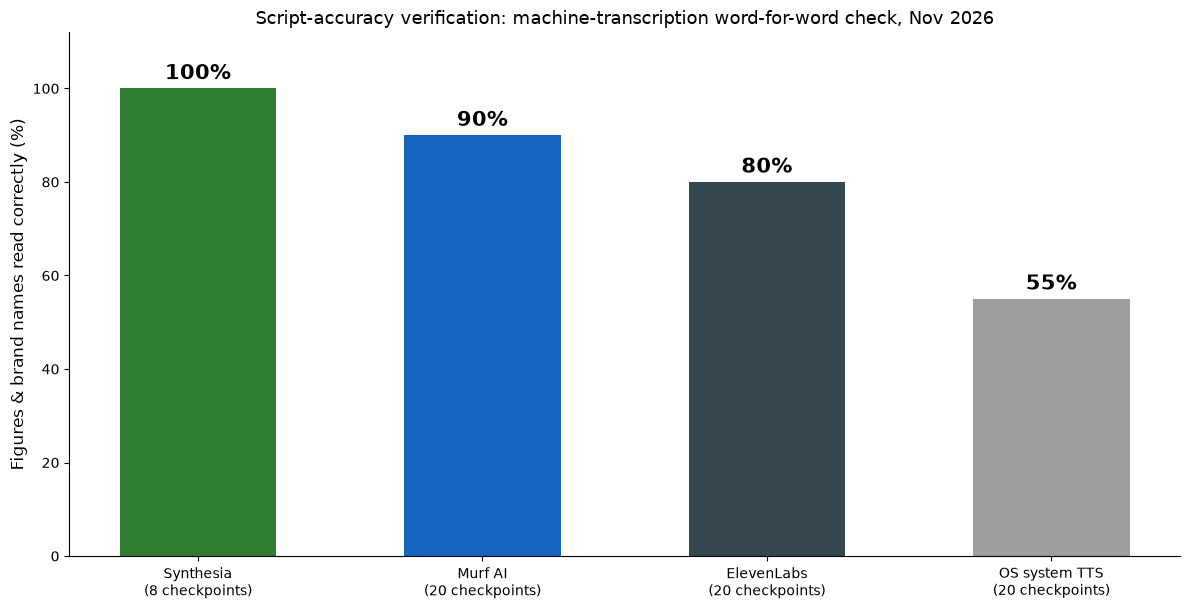
Result: 8/8 verifiable checkpoints correct. All five number traps survived: 1,250,000 was rendered as "one million two hundred fifty thousand dollars," the churn move came out as "five point two percent to three point eight percent," and 0.19, 87,000 and 96% all landed exactly. Nginx came out with the standard "engine-x" pronunciation and Açaí got the correct Portuguese "ah-sah-EE." Only GIF was unverifiable — transcription records both pronunciations identically.
| Checkpoint | Script says | Transcript heard | Verdict |
|---|---|---|---|
| Revenue | 1,250,000 dollars | 1,250,000 dollars | ✓ |
| Churn | 5.2% → 3.8% | 5.2% → 3.8% | ✓ |
| Latency | 96% under 200 ms | 96% under 200 milliseconds | ✓ |
| Unit price | 0.19 dollars | 0.19 dollars | ✓ |
| Users | 87,000 | 87,000 | ✓ |
| Brand: Nginx | Nginx | "Nginx" | ✓ |
| Brand: Açaí | Açaí | "ah-sah-EE" | ✓ |
| Brand: GIF | GIF | "GIF" (hard/soft G not distinguishable by ASR) | n/a |
For calibration on a similar (longer) script: Murf scored 18/20 and ElevenLabs 16/20 on a 20-checkpoint instructional script. Synthesia's perfect run is on a shorter script, so we won't crown it "more accurate" — but for a financial or training video where one wrong digit is a re-shoot, zero errors is exactly the bar that matters.
Test 2: Time to finished video (faster than we expected)
The editing itself is fast: pasting the script, picking a presenter and hitting generate took about five minutes, and Synthesia's built-in script review flagged nothing. Then the pleasant surprise: our 47-second video finished rendering in a few minutes, not the hour-plus we'd braced for. The editor-to-playable-video loop is genuinely quick.
| Step | Time |
|---|---|
| Paste script, choose avatar, configure scene | ~5 min |
| Render a 47-second video (free tier) | A few minutes |
| Compare: Murf 12-slide audio module, end to end | 38 min total |
That speed changes the verdict on iteration: re-rendering after a copy tweak costs minutes, not an afternoon. Combined with the template library, the workflow suits anyone who produces training video on a schedule — the constraint you'll hit first is the free tier's credits, not the clock.
Test 3: What the free tier actually gives you (read this before signing up)
This is the part most reviews skip, and where we found the sharpest edges:
| Free-tier reality | What we observed |
|---|---|
| Credits allowance | Billing showed 500 credits. One 47-second video left 0. In practice: about one short video per month. |
| Download | Not available. The download button opens an upgrade wall ("Download your videos in MP4" is a Starter feature). |
| Watermark / branding | Synthesia logo burned into the frame; removing it is a paid toggle. |
| Personal avatar | Slot exists in the UI but creating one requires upgrading. |
Translation: the free tier is a demo, not a workspace. You can prove the product works on your own script — genuinely useful — but you cannot ship the output. If your plan is "try it free, download the video," adjust your plan.
Pricing, mapped from the actual upgrade screens (November 2026)
| Plan | Price | Headline allowance | Unlocks |
|---|---|---|---|
| Free | $0 | 500 credits (≈1 short video, as measured) | Preview only: no download, branding on |
| Starter | $18/mo annual ($25 monthly) | ~150 min studio video / year, dubbing up to 197 min | MP4 download, logo removal, 125+ avatars, 3 guests |
| Pro | $64/mo annual ($89 monthly) | 72,000 credits/year (~720 min), dubbing up to 947 min | 5 personal avatars, 180+ avatars, branded pages, 5 guests |
| Enterprise | Custom | Unlimited minutes | 240+ avatars, 1-click translation into 80+ languages, SAML/SSO, SCORM export |
On Starter's nominal math, ~150 minutes for $18/month is roughly $0.12 per finished minute of avatar video — cheaper per minute than most voice-only tools once you factor that you're getting the presenter too. Just don't extrapolate from the free tier's credits; our measured burn was far less generous than the number suggests.
What we couldn't test
Full disclosure per our protocol: we did not blind-rank Synthesia's voice against ElevenLabs (its voices sit inside avatar video, a different job), we tested one avatar out of the stock library, and we did not test dubbing or the translation features (Enterprise-facing). We also could not test HeyGen — its app would not connect from our network during the test window. We score what we ran; we don't extrapolate.
Who should buy Synthesia
Buy it if: you produce training, onboarding, explainers or investor updates where a consistent presenter and zero numerical errors matter more than raw creative control. Start on Starter annual — the free tier can't export, so you'd be paying eventually anyway.
Skip it if: you need audio-only voiceover (that's ElevenLabs or Murf territory, at a fraction of the price), or you expected the free tier to carry a real project — it won't. Producing course content? Our dedicated guide to AI voiceover for e-learning covers when an avatar is overkill.
FAQ
Is Synthesia free to use?
There's a free tier, but it's preview-only: no MP4 download, Synthesia branding on the video, and — in our measurement — enough credits for about one 47-second video. Useful for evaluating, not for shipping.
Does Synthesia have a watermark?
Yes, on the free tier: the Synthesia logo is burned into the frame. Removing it requires a paid plan.
How accurate is Synthesia with numbers?
In our machine-verified test, all 8 verifiable checkpoints in a number-dense financial script were read correctly — better on this script than Murf (18/20) and ElevenLabs (16/20) on longer scripts. Accuracy is clearly a design priority.
How long does a Synthesia video take to render?
In our test, a 47-second video finished in a few minutes — fast enough to iterate. The editing itself took us about five minutes; the free tier's credit limit, not the clock, is what caps output.
Synthesia vs HeyGen — which is better?
We can't say yet: HeyGen was unreachable from our network during testing, and we don't score tools we haven't run. It's on our bench for the same protocol.
Those 8/8 checkpoints came from the same testing discipline we apply everywhere: a written answer key, machine transcription, and a word-by-word diff. The raw tables — including the TTS tools scored on the 20-item number test — are on the benchmarks page.
The numbers, one more time
| Criterion | Weight | Score |
|---|---|---|
| Voice realism (verified via transcript; no blind rank) | 30% | 7.5 |
| Production workflow (script-to-video ease) | 20% | 8.0 |
| Real cost per finished minute | 20% | 7.0 |
| Export rights & restrictions | 15% | 6.5 |
| Ease of use | 15% | 9.0 |
| Weighted total | 7.6 / 10 |